
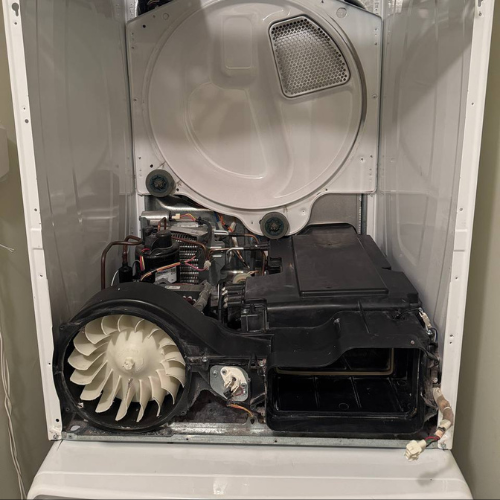

LG Dryer D80/D90 Flow Sense Error
How to handle LG dryer D80 and D90 Flow Sense warnings: lint, crushed duct, outside airflow, gas/electric variance, stop conditions, and service evidence.
How to handle LG dryer D80 and D90 Flow Sense warnings: lint, crushed duct, outside airflow, gas/electric variance, stop conditions, and service evidence.
LG d80 and d90 are Flow Sense restriction warnings, not automatic proof of a bad dryer sensor: check the lint filter, an accessible crushed or kinked transition duct, and outside exhaust airflow. Do not keep using the dryer with a severe recurring restriction; the full exhaust run must be cleaned or repaired before appliance-side diagnosis.
The code becomes useful only when the exhaust is divided into the dryer's short transition connection and the longer in-wall or shared duct to the exterior; clearing one does not prove the other is open.
LG D80 and D90 are Flow Sense airflow warnings. LG support describes d75, d80, d90, and d95 as exhaust restriction levels, with D80 and D90 indicating heavy restriction, and notes that hot humid air must vent somewhere or moisture stays in the drum. The important point for a homeowner is that these codes do not automatically mean the dryer’s sensor is bad. They mean the dryer is seeing conditions consistent with restricted exhaust, weak airflow, or in some gas-dryer cases a gas supply condition that must be separated from airflow.
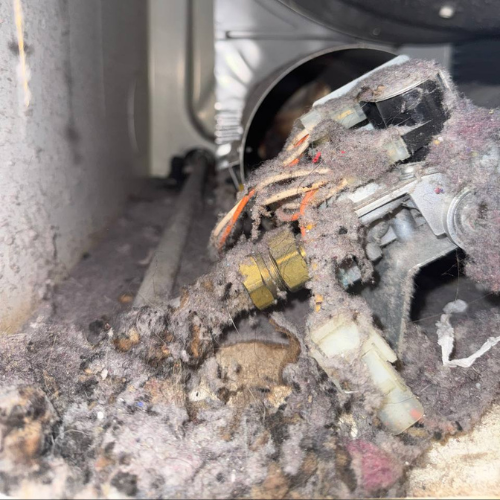
Do not keep running long loads after the warning. A restricted dryer can overheat, shut down, leave clothes damp, and create lint/fire risk. USFA dryer fire guidance points to cleaning lint filters, checking the rear of the dryer for lint buildup, and making sure the venting system is not damaged, crushed, or restricted. The owner-safe path is visible airflow proof, not internal sensor replacement.
D80 means the dryer believes the exhaust path is around the 80 percent restricted range; D90 is more severe. Flow Sense bars or a D95 warning make the same message stronger. The warning can appear with long dry times, hot cabinet, damp clothes, or shutdown. It can also appear after installation when the duct run is too long, kinked, crushed, or has too many elbows. In apartments, the exterior termination may be on a roof, shaft, or shared route that the homeowner cannot fully inspect.
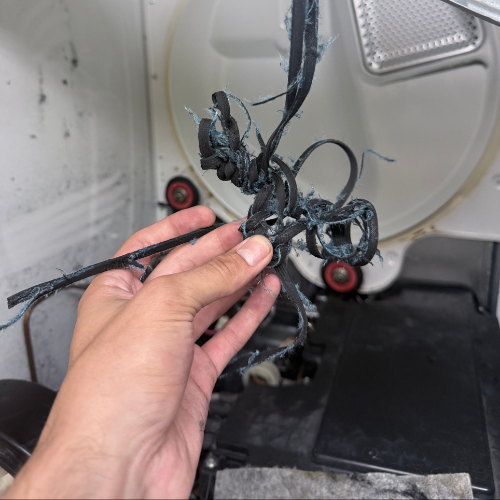
Start with what you can see. Remove lint from the lint filter. Check whether the flexible hose behind the dryer is crushed, kinked, compressed behind the unit, or looped into a coil. If the dryer is running and you can safely reach the outside termination, confirm whether air is moving outside. Weak or no outside airflow with the dryer running is strong evidence that the restriction is outside the drum, not a bad load of clothes.
Do not remove internal panels, defeat thermostats, disconnect gas, or try to disable Flow Sense. Do not push the dryer back tightly after cleaning the visible hose; that can recreate the same crushed duct. If the warning returns after the visible duct is straight and the lint screen is clean, the restriction may be in the concealed duct or exterior vent.
The warning does not prove the Flow Sense sensor is bad. It does not prove the heater is bad. It does not prove the dryer needs a control board. It also does not prove the entire vent is clean because the lint screen looks clean. Lint can collect in the transition hose, wall duct, roof cap, bird screen, exterior hood, or a long run with elbows. A dryer can move enough air to feel warm at the door and still fail the exhaust restriction check.
Another false assumption is that vent cleaning means the dryer is cleared. If only the short hose behind the dryer was vacuumed, the building duct may still be restricted. If the warning appears in a high-rise or condo, the actual blockage may be beyond what the resident can access. That is why evidence about outside airflow and duct geometry matters.
If D80 or D90 appears after installation, focus on duct length, elbows, crushed hose, and termination. If it appears after years of normal use, focus on lint accumulation, exterior flap restriction, roof cap, or a crushed hose after the dryer was moved. If it appears only on towels and bedding, load size and moisture volume may be exposing a marginal vent. If the dryer is electric and also has no heat, use the gas-vs-electric no-heat comparison. If it is gas and D80 appears with ignition problems or no heat, record gas supply and flame behavior without disassembling anything.
A useful test is not “run another full cycle.” It is a short, watched cycle with a clean lint filter, small load, and visible duct positioned without kinks. If the warning returns quickly, stop. If airflow outside is weak, call for vent cleaning or building maintenance before appliance parts. If outside airflow is strong and the code returns with the transition duct removed only by a professional, then dryer-side diagnostics may be needed.
In NYC, many dryers vent through long concealed routes, roof terminations, exterior walls that residents cannot access, or shared building shafts. Some apartments have ventless dryers or combo units, which should not be diagnosed with this LG vented-dryer Flow Sense path. If your unit is in a closet, stacked, or part of a WashTower, access may require moving the appliance safely and coordinating with the building. Do not climb to a roof, open a shaft, or remove a shared duct.
Building management may need to verify the termination, roof cap, or shared vent route. If the dryer is under warranty, the appliance company may still require proof that the home exhaust path is clear before replacing parts. Save the evidence in a way that separates appliance behavior from building vent behavior.
Photograph the exact code, Flow Sense bars, lint screen, transition duct behind the dryer, outside vent if accessible, model tag, and the load type. Record how many minutes into the cycle the code appears, whether clothes are hot and damp or cold and damp, whether the dryer shuts down, and whether air moves outside. If a vent cleaner or building staff inspected the duct, save that note too.
If the vent route is the real issue in an apartment, use dryer vent clogged in an NYC apartment. If the dryer has no heat and you need to separate gas from electric causes, use dryer not heating: gas vs electric. If the symptom is mainly damp clothes without an LG code, compare dryer clothes still damp or Bosch dryer not drying clothes for the drying-performance diagnosis.
The hard cases are the ones where the short visible hose looks clean but the code keeps returning. That does not make the code meaningless. It usually means the proof has to move farther down the exhaust path: wall duct, roof cap, exterior hood, bird screen, booster fan, long run, or crushed section hidden behind the appliance. In a building, that proof may belong to maintenance or a vent-cleaning company rather than the dryer owner.
Record whether the warning appears with the dryer connected to the wall duct and whether airflow is strong at the exterior termination. Do not ask the appliance technician to guess a sensor until the home exhaust path is documented. At the same time, do not let vent cleaning become an endless loop if a qualified vent inspection confirms the duct is open and the dryer still flags the same condition. At that point, dryer-side diagnostics can be justified with evidence.
Apartment and condo dryers often do not have a simple outside wall hood that the resident can inspect. If the duct goes into a wall, ceiling, shaft, or roof, write that down. Photograph the visible transition hose and the closet installation. If building staff or a vent cleaner checks the termination, ask for the finding in writing: blocked, weak airflow, clear, damaged, inaccessible, or shared. That note helps avoid the common loop where the appliance company blames the duct and the building blames the dryer without either side proving airflow.
If the warning happens only when the dryer is pushed back into place, the transition hose position is a prime clue. Pulling the dryer forward for cleaning and then pushing it back can crush the hose again. The final installation position matters. A photo with the dryer in its normal location is often more useful than a photo taken while the hose is temporarily straightened.
Also note whether the code appears with timed dry, sensor dry, or both. A restriction warning across different cycles strengthens the airflow diagnosis. A warning only with oversized loads may show that the vent is marginal and fails under heavier moisture load.
If both cycles trigger D80 or D90 quickly, stop and document the duct path before more drying. A fast repeat code with a clean lint screen is strong evidence that the restriction is not solved by another ordinary load.
Unplugging may clear the display temporarily, but it does not clear a restricted vent. If the airflow condition remains, the warning can return.
Yes. LG describes the number as restriction severity. D90 should be treated as a stronger stop-and-check airflow warning.
Yes. The restriction can be behind the dryer, inside the wall duct, at the exterior vent, or in a long run with elbows.
No. Prove the exhaust path and installation first. Sensor diagnosis belongs after airflow and duct evidence are clear.
Yes. The restriction can be in the transition connector, concealed wall duct, long or multi-elbow run, roof cap, exterior hood, or another downstream section.
After a qualified full-run vent inspection documents acceptable airflow but the warning still returns, service can prove the dryer fan, internal air path, sensing, and control response.
LG requests are considered in Brooklyn, Manhattan below 96th Street, and selected Queens routes; WashTower, stacked laundry, built-in, and connected-model details are checked before routing.



Technician experience standard: 4+ years of hands-on appliance repair per technician; senior technicians bring 8 and 16 years. LG intake starts with model and serial, appliance form, display or ThinQ message, failed stage, and stacked or built-in access. Independent service; no current manufacturer authorization implied.

