.avif)
Samsung Dryer Repair
Identify your Samsung dryer before repair work is planned
Samsung dryer diagnosis starts by separating the display family, heat source, airflow path, sensor behavior, stacked-control setup, and installation access. A 9C1 voltage message, HC/hE heat message, tC/tE temperature message, door-family code, vent blockage test result, GAS/HC2 issue, no-code damp load, and no-start complaint do not belong in one generic repair answer.
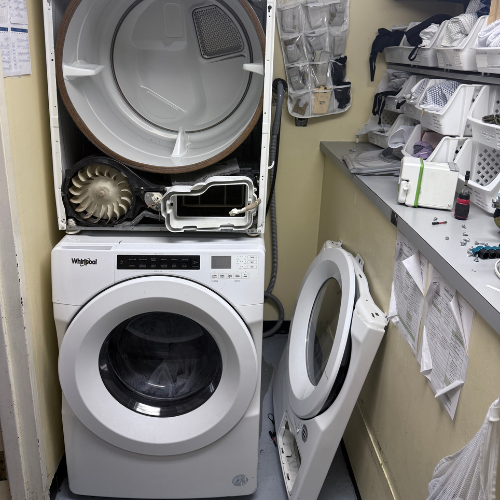
Send the model tag, display photo, selected cycle, load type, heat behavior, lint filter photo, visible vent or drain photo if applicable, and installation photos. If the dryer is stacked or built in, document the opening before moving anything.
Samsung dryer symptom patterns
Samsung dryer complaints can look similar from the outside. A warm damp load, a fully cold load, a no-start, a noisy drum, a hot cabinet, and a display message require different situations.
Display-first issue
Start from the exact display family before treating the complaint as heat, airflow, door, power, control, firmware, or stacked-interface behavior.
Heat-result issue
Separate fully cold loads, overheated shutdowns, warm damp loads, and vent-blockage-test results before discussing a repair situation.
Stacked-control issue
For multi-control or SmartThings cases, record which interface showed the message and whether the dryer was updating or being controlled through the washer.
Door and start issue
A no-start complaint needs door state, latch condition, child lock, delayed start, drum response, and power stability before it becomes a motor or control situation.
Safety issue
Gas odor, smoke, burning smell, abnormal heat, water near power, unstable power, or returning shutdown ends observation and moves the page to stop-use guidance.
Samsung dryer common problems and diagnostic differences
Each situation below keeps customer action to observation or accessible checks, then states the stop boundary and what the technician confirms.
9C1, 9E, 2E, or 9E1 voltage message
The dryer shows a voltage-family message, may run without normal heat, or appears after a stacked multi-control interaction. Samsung ties these codes to abnormal voltage and notes a multi-control kit 9C1 nuance. The split changes when: Electric/gas platform, dedicated circuit, install history, SmartThings update state, and whether the washer is controlling the dryer all change the issue.
Safe: Photograph the display and visible plug/outlet context if safe. Avoid: Do not inspect wiring, open panels, or keep using a dryer with unstable power behavior. Stop: Stop for breaker trip recurrence, hot outlet, electrical odor, flicker, or water near power.
Send: Display photo, model tag, installation photos, stacked/multi-control setup, and timing. Confirm: Confirm supply, multi-control context, dryer heat request, installation, and model-specific service issue. Result: Electrical boundary issue; collect evidence and plan appliance diagnosis.
HC, hE, HC4, or 1 HC heating/overheat message
The dryer reports a heat or overheat message, runs hot, shuts down, or leaves loads damp after heat behavior changes. Samsung groups these as heating errors and connects heat trapping to lint screen or vent restriction before service. The split changes when: Lint filter, exhaust restriction, gas/electric platform, vent path, load size, and cabinet heat change the situation.
Safe: Clean the visible lint filter and photograph the warning and install. Avoid: Do not keep running hot cycles, open panels, or name a heater part from the code alone. Stop: Stop for burning smell, smoke, unusual heat, shutdown, or returning heat code.
Send: Code photo, load type, heat behavior, lint filter, visible vent path, and closet photos. Confirm: Confirm airflow, vent restriction, heater request, temperature sensing, gas/electric platform, and access. Result: Heat/airflow issue; appliance diagnosis if the warning returns after safe visible checks.
tS, t5, tC, tE, or related temperature code
The display shows a temperature-family code or the dryer behaves as if temperature feedback is wrong. Samsung identifies this family as temperature or sensor-measurement errors and situations continued errors to service. The split changes when: Airflow, lint screen, vent restriction, moisture sensing, heat source, and model display version all matter.
Safe: Photograph the exact code and note whether the drum was cold, warm, or unusually hot. Avoid: Do not test sensors, remove covers, or keep restarting after the code returns. Stop: Stop for overheating, odor, smoke, shutdown, or returning sensor code.
Send: Exact code, model tag, cycle, heat behavior, filter state, and access photos. Confirm: Confirm airflow, temperature sensing, heater response, wiring path, controls, and model context. Result: Temperature-sensing issue; safe customer work ends at evidence and visible lint/vent observations.
Vent blockage test result
The dryer displays Clg, Cg, C80, C8, C90, C9, or Ct after a vent blockage test. Samsung describes those as vent blockage test results, including different restriction levels and a temperature condition for Ct. The split changes when: Test context, room temperature, visible lint filter, exhaust issue, outside hood, and stack/closet access change the decision.
Safe: Clean the lint filter and photograph visible vent path without moving the dryer. Avoid: Do not clear hidden ducts, pull a stacked unit out, or run repeated tests to force a different number. Stop: Stop for hot cabinet, odor, shutdown, or returning blockage result.
Send: Result photo, model tag, vent/closet photos, load state, and whether the dryer was in normal room temperature. Confirm: Confirm machine lint path, transition duct, building exhaust, sensor response, and access. Result: Vent/access issue; appliance diagnosis only after restriction and access are separated.
Door, latch, or door-sensor message
The display shows dC, dE, dF, do, d0, 1 DC, or 1 dF, or the dryer will not start because the door state is not accepted. Samsung groups these as door, latch, and door-sensor errors. The split changes when: Trapped clothing, visible latch damage, stacked access, door alignment, and whether the code clears after normal closure decide the path.
Safe: Check for trapped laundry and close the door normally. Avoid: Do not force the latch, tape the door, or defeat the door switch. Stop: Stop if the door is damaged, will not latch normally, or the code returns.
Send: Door photo, display photo, model tag, and short start attempt video. Confirm: Confirm latch feedback, door sensor response, control interpretation, and access. Result: Door issue; appliance diagnosis if normal closure does not resolve it.
Warm but damp clothes with no code
The dryer heats, but towels, bedding, or mixed loads remain damp or take longer than expected. Samsung separates warm-but-damp from no-heat and points to lint, vent blockage, Eco Dry, load behavior, and moisture sensors. The split changes when: Heat present, Eco Dry, sensor dry, load mix, vent path, lint filter, washer spin, and closet heat change the issue.
Safe: Record cycle, load, heat level, lint filter condition, and whether Eco Dry or sensor dry was used. Avoid: Do not assume a heater failure or keep extending hot cycles until the cabinet overheats. Stop: Stop for hot cabinet, burning smell, smoke, or repeated vent/heat warning.
Send: Cycle, load, heat behavior, model tag, filter photo, vent/closet photos. Confirm: Confirm airflow, moisture sensing, cycle settings, load behavior, heat source, and access. Result: Moisture-removal issue; safe observation first, then appliance/vent decision.
No hot air at all
The drum turns but the load stays cold, or the dryer never appears to produce heat. Samsung's dry-clothes support separates no heat from weak heat before diagnosis the issue. The split changes when: Gas/electric platform, supply, cycle settings, lint/vent restriction, voltage code, and install history decide the situation.
Safe: Record whether the drum turns, whether any warmth appears, and whether the dryer is gas or electric. Avoid: Do not open heating areas, check gas fittings, or inspect wiring. Stop: Stop for gas odor, breaker trip recurrence, electrical odor, smoke, or burning smell.
Send: Model tag, gas/electric type, cycle, heat behavior timeline, and install photos. Confirm: Confirm supply, heat request, ignition or electric heat issue, airflow, sensors, and controls. Result: No-heat issue; appliance diagnosis after safe evidence collection.
Turns on but will not start or spin
The panel wakes but the dryer will not start, the drum does not move, or start behavior stops immediately. Samsung support separates display and start behavior from active drying faults. The split changes when: Door state, child lock, delayed start, motor/drum behavior, power stability, and stacked controls can change the path.
Safe: Record display state and a short video of the start attempt. Avoid: Do not hold switches, press a stuck latch beyond normal movement, or keep starting a humming dryer. Stop: Stop for abnormal drum movement, burning smell, repeated failed starts, or power instability.
Send: Start video, display photo, model tag, door state, and access photos. Confirm: Confirm door feedback, motor response, control state, supply, and safe access. Result: No-start/drum issue; evidence first, then appliance diagnosis.
Button or panel message
The dryer reports bE, bE2, bC2, 6E, 6E2, or 6C2, or a panel button appears stuck. Samsung groups those as stuck or continuously pressed button errors. The split changes when: Moisture on panel, damaged buttons, locked controls, stacked access, and code return after gentle release change the issue.
Safe: Power the dryer off and gently release visible buttons if safe and dry. Avoid: Do not pry buttons, flood the panel with cleaner, or open the console. Stop: Stop if the panel is wet, damaged, flickering, or the code returns.
Send: Code photo, panel photo, model tag, and timing. Confirm: Confirm button state, control input, moisture exposure, and electronics issue. Result: Panel issue; appliance diagnosis if the code returns or damage is visible.
Communication code
The display shows AC, Et, AE, EEE, AE4, AE3, AE5, E3, or 1 AC, or the dryer behaves inconsistently between display and action. Samsung groups these as communication errors between internal systems. The split changes when: Power stability, water exposure, stacked control kit, display timing, and code return change the issue.
Safe: Photograph exact code and note what the dryer was doing when it appeared. Avoid: Do not open electronics areas or keep cycling power after the code returns. Stop: Stop for returning code, water nearby, odor, heat, or unstable power.
Send: Code photo, timing, start behavior video, model tag, and access photos. Confirm: Confirm power, display state, communication issue, electronics state, and safe access. Result: Appliance diagnosis situation; customer action stops at evidence.
Gas ignition or gas-display issue
The display shows HC2 or the gas dryer tumbles without heat after recent installation or supply changes. Samsung lists HC2 as a gas ignition example in the technical-code group. The split changes when: Gas-supply state, recent movement, venting, ignition timing, odor, and model-specific code meaning change the issue.
Safe: Photograph the display and note recent installation or supply changes. Avoid: Do not loosen fittings, relight anything, or move the dryer to inspect hidden supply parts. Stop: Stop and leave the area for gas odor; stop for burning smell or repeated failed heat attempts.
Send: Display photo, model tag, install history, symptom timing, and access photos. Confirm: Confirm gas supply responsibility, ignition sequence, safety response, airflow, and controls. Result: Gas heat issue; safety boundary first.
Download, child lock, or stacked-control confusion
The display shows dn, CL, or a stacked washer interface appears to report a dryer condition. Samsung explains dn as download in progress, CL as child lock, and notes multi-control kit behavior around 9C1. The split changes when: SmartThings update state, stacked kit, washer control timing, child lock state, and display wording change the issue.
Safe: Photograph the display and avoid interrupting power when dn is shown. Avoid: Do not unplug during dn, force locked controls, or assume the washer code is a washer problem without display context. Stop: Stop troubleshooting if the display remains stuck after the official support boundary or controls do not respond normally.
Send: Display photo, model tag, stacked control photo, SmartThings/update state if known, and timing. Confirm: Confirm update state, child lock/control state, washer/dryer interface, and model issue. Result: Control-state issue; evidence before booking.
Samsung dryer code and symptom atlas
Only officially documented dryer codes, messages, or symptom patterns belong here. Model, display wording, timing, heat behavior, and installation still control the final issue.
9C1/9E/2E/9E1: Voltage and supply issue
The dryer is pointing to abnormal supplied voltage or a related control issue. Safe checks: Photograph the display and visible plug/outlet context if safe.
Stop using the appliance if: Stop for breaker trip recurrence, hot outlet, electrical odor, or flicker. Technician confirmation: Confirm supply, installation, dryer heat request, and model-specific multi-control context.
HC/hE/HC4/1HC: Heating or overheat issue
The dryer is reporting heat or overheat behavior. Safe checks: Clean visible lint filter and document whether the cabinet is hot, warm, or cold.
Stop using the appliance if: Stop for burning smell, smoke, unusual heat, shutdown, or returning heat code. Technician confirmation: Confirm airflow, exhaust restriction, heater request, sensor feedback, gas/electric platform, and access.
tS/t5/tC/tO/t0/tE/tE3/tC5/tCS: Temperature-sensing issue
The dryer is pointing to a temperature or sensor-measurement issue. Safe checks: Photograph exact code and note heat behavior and lint/vent condition.
Stop using the appliance if: Stop for overheating, odor, smoke, or returning sensor code. Technician confirmation: Confirm airflow, temperature sensing, wiring path, heater response, and controls.
dC/dE/dF/do/d0/1DC/1dF: Door, latch, and door-sensor issue
The dryer is pointing to door closure, latch, or door-sensor feedback. Safe checks: Check for trapped clothing and normal door closure without forcing the door.
Stop using the appliance if: Stop if the door will not latch normally, is damaged, or the code returns. Technician confirmation: Confirm latch feedback, door switch/sensor response, control reading, and access.
Clg/Cg/C80/C8/C90/C9/Ct: Vent blockage test issue
The dryer is reporting the result of a vent blockage test or temperature condition. Safe checks: Clean visible lint filter and photograph visible vent path without moving a stacked unit.
Stop using the appliance if: Stop for hot cabinet, odor, shutdown, or returning blockage result. Technician confirmation: Confirm machine lint path, transition duct, home exhaust, sensor response, and access.
AC/Et/AE/EEE/AE4/AE3/AE5/E3/1AC: Communication issue
The dryer is reporting communication between internal systems. Safe checks: Photograph exact code and timing; avoid repeated attempts if it returns.
Stop using the appliance if: Stop for returning code, odor, water nearby, or unstable power. Technician confirmation: Confirm power, display state, electronics communication, and safe access.
3C/oD/1AC7/HC2: Other technical example issue
Samsung lists these as examples of motor, dry-time, electronic, or gas-ignition situations. Safe checks: Photograph exact code and describe what the dryer did before it appeared.
Stop using the appliance if: Stop for gas odor, abnormal drum movement, heat/odor, or returning technical code. Technician confirmation: Confirm model-specific meaning, platform, supply, ignition/drum behavior, and controls.
dn: Download in progress issue
The dryer is showing firmware download in progress. Safe checks: Photograph the display and do not interrupt power while dn is shown.
Stop using the appliance if: Stop trying to use the dryer while download is active; service issue if display remains after Samsung's support boundary. Technician confirmation: Confirm update state, display behavior, power stability, and model support issue.
Safe Samsung dryer checks before booking
Safe customer work is observation: photograph the display, note the cycle, document the load, clean only the visible lint filter, and inspect only visible access points without moving a stacked or built-in dryer.
Do not remove covers, inspect wiring, loosen gas supply parts, defeat door or safety switches, pull a stacked dryer forward, reach behind a built-in appliance blindly, press a stuck latch beyond normal movement, or keep running cycles after a returning fault.
Stop using the dryer for smoke, burning smell, unusual heat, active water near powered areas, abnormal drum movement, gas odor, or a breaker that trips again.
When service is the right next step for Samsung dryer
A visible lint filter check or clear load/cycle correction may resolve a simple situation. Service becomes the right situation when a code returns, heat behavior remains unclear, the dryer is fully cold, no-start persists, abnormal sound continues, airflow cannot be verified safely, or access is blocked by a stack, closet, cabinet, duct, or building rule.
- Evidence first: model, display, load, cycle, heat, filter, and install data are not complete.
- Safe visible checks: visible lint filter, visible vent clue, door closure, or cycle selection can be checked without moving the appliance.
- Access requirements: stack, closet, cabinet, vent, drain, outlet, or building access blocks the situation.
- Appliance diagnosis: repeated code, no heat, no-start, sensor/control behavior, drum issue, or noise remains after safe observations.
- Stop using the appliance: smoke, burning smell, unusual heat, water near power, gas odor, abnormal movement, or breaker trip recurrence.
What to send for Samsung dryer service
- Model tag photo and full display photo.
- Selected cycle, load type, and whether the dryer became warm or stayed cold.
- Visible lint-filter photo and visible vent, outlet, or drain/condensate photos where safe.
- Wide installation photos showing stack, closet, cabinet, floor, door swing, and side clearance.
- Building access notes: COI request, service elevator, doorman, super access, and floor protection.
NYC apartment and building access notes for Samsung dryers
Samsung dryers in Brooklyn and Manhattan are often stacked, set in closets, surrounded by cabinetry, connected to long vent runs, or blocked by building access rules. Those details change the first service decision.
If the dryer cannot be reached without lifting, dragging, removing cabinetry, kinking a duct, or pulling hidden supply parts, the first step is access planning. Photos of the opening, floor, side clearance, vent path, and building requirements prevent the visit from starting on the wrong situation.
Samsung dryer related diagnosis
This issue uses Brooklyn and Manhattan as the service-area claim and links only to confirmed internal situations.
- Residential dryer repair: broader dryer repair issue.
- Samsung washer repair: same-brand washer issue.
- Samsung dryer HC overheating: deeper exact-issue help issue.