


Samsung Dryer HC Error: Overheating
Samsung dryer HC error? Stop repeated use, check lint and vent airflow, vent blockage test, hot cabinet, load, and when service is needed.
Samsung dryer HC error? Stop repeated use, check lint and vent airflow, vent blockage test, hot cabinet, load, and when service is needed.
Samsung HC, hE, HC4, or 1 HC is a heating error that commonly means the dryer is getting too hot because lint or the exhaust system is trapping heat. Clean the owner-accessible lint path and have the vent proved; if HC returns, stop repeated hot cycles and have supply, temperature sensing, heater, safeties, and control operation diagnosed.
Save the exact display before resetting it: HC-family heating errors, temperature-sensor codes, and gas-ignition codes do not identify the same system or permit the same next step.
A Samsung dryer HC error should be treated as a heat or overheating warning, not as a casual reset code. Samsung’s dryer error-code support lists HC among heat-related errors and points users toward cleaning the lint filter and exhaust vent when heat or vent blockage codes appear. Samsung’s vent blockage test guidance explains that newer dryers can reduce heat when blockage is detected. That makes airflow and heat management the first priority before any sensor, element, or board is blamed.
Do not keep restarting the dryer to see whether HC clears. If the dryer is overheating, repeated cycles can make the cabinet hotter, damage laundry, trip safety devices, or hide the original timing. Stop, photograph the code, clean the lint screen, and document the vent path.
HC is not a lint-screen reminder only. It means the dryer detected a heat condition that needs attention. The cause can be restricted exhaust, lint buildup, blocked or crushed vent, overloaded load, failed temperature feedback, heating control fault, or installation condition. The safe homeowner job is to separate airflow clues from no-heat clues and preserve the code.
If the dryer heats but shuts down, airflow and overheating stay high on the list. If the dryer is cold and shows a heat code, service-level sensing or control logic may be involved. If the cabinet is hot or there is burning smell, stop immediately.
Do not open panels, test sensors, replace thermal devices, disconnect a gas dryer, or run with the vent dumping into the room. The airflow path may be partly outside the appliance, especially in apartments.
A dryer removes moisture by moving heated air through the load and out through the exhaust. If lint or duct restriction blocks that path, heat can build inside the dryer while moisture stays in the clothing. Samsung support for poor drying notes that the dryer may not heat normally if it detects heat and moisture are not leaving. That is why a vent problem can look like both overheating and poor drying.
If the dryer was drying slowly before HC appeared, vent restriction becomes more likely. If the outside vent flap no longer opens, airflow is weak, or lint appears around the duct connection, the appliance may be warning about the exhaust path rather than an internal electronic failure.
HC does not prove the thermistor is bad. It does not prove the heating element is shorted. It does not prove the control board failed. Those are possible service possibilities, but they come after lint, load, duct, vent path, installation, and code history are recorded. Replacing a heat part without correcting a clogged vent can bring the error back.
It also does not prove the dryer is safe because it still runs. A dryer can tumble and still be overheating. Treat cabinet temperature, odor, and shutdown behavior as stronger safety clues than whether the drum turns.
In NYC apartments, the vent may run through a wall, ceiling, roof, or long concealed duct. The resident may only see the first few inches behind the dryer. A Samsung vent blockage test can help document a restriction, but it does not clean a building-controlled duct. If the duct is hidden, save the code, photos, and test result for management or service.
Do not pull a stacked or gas dryer out alone to inspect the duct. If the dryer is gas, do not disconnect it. If the vent disappears into a wall and HC returns, the next step may require building coordination.
Save the HC code photo, model tag, cycle, load type, lint screen photo, vent connection photo, vent blockage test result, final load temperature, whether clothes were warm damp or hot damp, and whether the dryer shut down. Record whether the issue began after moving the dryer, installing a new vent hose, building work, or a long period of slower drying.
A useful service note says: Samsung dryer shows HC after ten minutes, lint screen cleaned, cabinet hot, vent path hidden in apartment wall, clothes warm damp. That tells the technician to evaluate heat and airflow together.
If the dryer shows LG D80 or D90 instead, use LG dryer D80/D90 error. If the vent is the main clue in an apartment, use dryer vent clogged in an NYC apartment. If the dryer takes too long and shuts off, use dryer takes too long and shuts off. If the dryer is cold and fuel type matters, use dryer not heating: gas vs electric.
Yes. Samsung heat and vent guidance makes airflow a primary clue when heat cannot leave correctly.
No. Repeated heating through a suspected restriction is not a safe diagnostic method.
No. Lint can collect in the transition duct, wall duct, elbows, or exterior termination.
The code, timing, load, heat level, vent test result, lint screen, duct access, and any odor or shutdown.
Samsung’s vent blockage test is useful only when interpreted with the symptom. A failed or warning result supports a restricted exhaust path. A passing result does not prove every heat-control part is healthy, and it may not prove a long concealed apartment duct is perfect under all loads. Save the result, but still record load temperature, cabinet heat, and whether HC returns.
If the model does not have the test or the test cannot be run safely, do not force hidden modes. The visible code, lint condition, vent access, and heat behavior are still enough evidence for service.
HC is a Samsung heat error, while LG D80/D90-style codes are airflow percentage warnings on LG models. The homeowner action overlaps: stop repeated use, clean lint, document vent path, and avoid running through restriction. But the code meaning and brand logic should not be mixed. Use the exact display text.
Overloading can make a dryer run hot and dry slowly because air cannot pass through the load. Heavy towels and bedding are common triggers. A proof load should be modest and similar fabrics. If a small load runs normally but a heavy load triggers HC, load and airflow margin are part of the diagnosis.
If lint screen, visible duct, load, and vent access are addressed and HC returns on a small load, service-level temperature sensing, heater control, relay, element, gas ignition, or board fault becomes plausible. That still does not belong in homeowner DIY. The value of the owner check is to prevent replacing those parts while a clogged vent remains.
Say whether HC appears immediately, after several minutes, after heavy loads, or after the cabinet gets hot. Mention whether the dryer is gas or electric and whether a vent blockage test was run. Timing and fuel type decide the first professional tests.
Sometimes a user sees HC and later reports no heat because the dryer reduces or stops heat after detecting a problem. That later cold load does not erase the original overheating code. Save the first code and timing. The technician needs to know whether heat was high first and missing later.
If the dryer is in a closet and the duct disappears into a wall, the vent path may not be homeowner-accessible. Photograph the duct entry and the room. Ask building management about vent cleaning history if HC returns. A dryer can be blamed for a restriction that is outside the appliance cabinet.
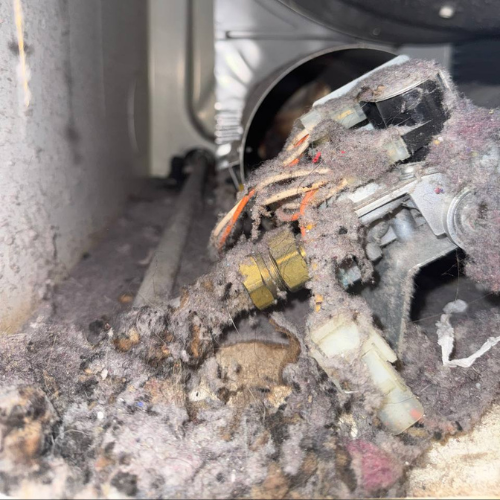
A clean lint screen is only the first filter. Lint can remain in the blower housing, transition duct, wall duct, elbows, or exterior termination. The owner should not open the dryer to clean internal passages, but should not assume the vent is clear because the screen is clean.
Heavy towel and bedding loads hold heat and moisture. If HC appears mostly on those loads, load size and airflow margin are part of the diagnosis. A small proof load can show whether the dryer overheats under normal conditions or only when overloaded.
If HC appears with warm damp clothes, hot cabinet, long dry time, or weak airflow, airflow should be verified before heat parts are replaced. If HC appears immediately on a cold start with no heat, temperature sensing or control diagnosis may move earlier. Timing decides the path.
Clearing HC before photographing it removes the strongest evidence. A technician may see a normal dryer after it cools, especially if the vent restriction is intermittent or load-dependent. Save the code, then save the load condition. If the load is hot damp, say that. If the load is cold after HC, explain that the code came first and cold operation came after.
If the error follows a vent cleaning, new dryer installation, or duct change, include that. A duct can be reconnected poorly, crushed behind the dryer, or routed with too many bends. The appliance may be correctly warning about an installation problem.
No. Samsung groups HC with heating or too-hot errors, while HC2 is listed separately as a gas-ignition error; preserve the exact characters.
Samsung notes that some electric-dryer heating errors can occur when the heater is not hot enough because of low voltage. A qualified electrician or technician must prove supply under load.
Samsung requests are considered in Brooklyn, Manhattan below 96th Street, and selected Queens routes; Bespoke panels, Laundry Hub access, and connected-appliance details are confirmed with the address.


Technician experience standard: 4+ years of hands-on appliance repair per technician; senior technicians bring 8 and 16 years. Samsung intake starts with Model Code, product form, panel or app message, failed stage, and installation access. Independent service; no current manufacturer authorization implied.

