.avif)


.avif)
Miele Dryer Repair
Identify your Miele dryer before repair work is planned
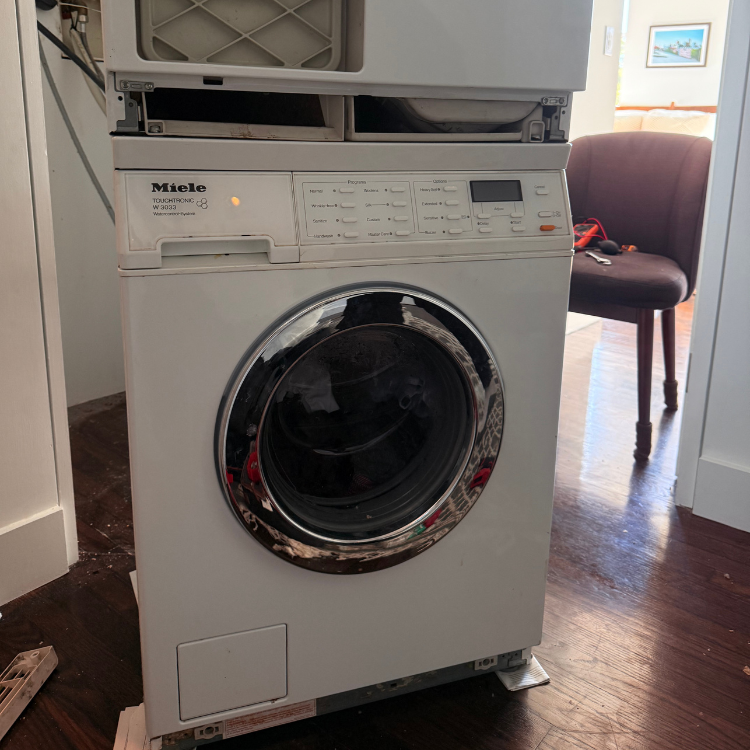
Miele dryer diagnosis depends on exact model, program, display wording, filter and plinth-filter access, condensate setup, load moisture, washer spin result, cabinet ventilation, and whether the dryer is stacked or built into a tight NYC opening.
Send the model tag, full display photo, selected cycle or program, load type, whether water or heat behavior changed, visible hose/filter/door photos where safe, and wide installation photos. If the appliance is stacked or built in, document access before moving anything.
Miele dryer symptom patterns
Miele dryer complaints can look similar from the outside. The diagnosis changes when the same symptom has different model, platform, water, heat, load, code, or access evidence.
Display-message issue
Clothes still damp or F55; F66 filter or plinth-filter warning; Empty out container message; F50 after door opening or load issue; F53 drive or electronic technical fault.
Drying-result issue
Clothes still damp or F55; Long dry time with no code; Dryer heats but stops early.
Filter and moisture issue
F66 filter or plinth-filter warning; Empty out container message; Water, condensate leak, or container issue.
Access issue
Stacked or built-in dryer cannot be safely accessed.
Safety issue
Safe Miele dryer checks before booking.
Miele dryer common problems and diagnostic differences
Each situation keeps customer action to observation or accessible checks, then states the stop boundary and what the technician confirms.
Clothes still damp or F55
The cycle ends after a long run, towels or heavier items stay wet, or the machine reports that maximum drying time was reached. Miele F55 support ties this issue to load size, washer spin speed, damp laundry, lint filters, and warm installation conditions. The decision changes when: Load type, washer spin result, filter state, room temperature, cabinet clearance, and whether the problem appears only on bulky loads all change the situation.
Safe: Note the program, load type, whether the washer left the load unusually wet, and whether the lint filters are visibly loaded. Avoid: Do not start opening covers, digging into the heat-pump area, or buying parts from F55 alone. Stop: Stop if the cabinet is unusually hot, if a burning smell appears, if the code returns immediately, or if water is collecting near powered areas.
Send: Send the display photo, model tag, program name, load type, washer spin setting if known, filter photos, and installation photos. Confirm: The visit separates load moisture, filter restriction, airflow/temperature condition, sensor feedback, condensate handling, and heat-pump operation before repair is discussed. Result: Safe observation first; clean accessible lint filters only; appliance diagnosis if F55 returns after normal load and visible filter checks.
F66 filter or plinth-filter warning
Drying slows down, the machine warns about filters, or the fault appears after a period of operation. Miele F66 support maps this issue to lint filters, plinth filter, the heat exchanger area, ventilation, load, damaged filter material, and technical fault. The decision changes when: A wet plinth filter, crushed filter material, blocked cabinet breathing space, overloaded drum, and a closet with poor air exchange point to different next steps.
Safe: Look at the lint filters and the accessible plinth filter. If the model instructions allow cleaning, let the filter dry before reinstalling it. Avoid: Keep hands and tools away from heat-exchanger fins, do not scrape the fin area, and do not run the dryer with a deformed filter installed. Stop: Stop if the warning returns after safe cleaning, if the dryer overheats, if airflow feels blocked by the install, or if water appears near electrical areas.
Send: Send display photos, filter photos, plinth filter photos, closet/cabinet photos, and the exact model tag. Confirm: The visit checks whether the alert is caused by accessible filter condition, cabinet ventilation, filter damage, sensor feedback, or a technical fault. Result: Clean/empty/check accessible item only; appliance diagnosis needed if the warning returns or filter damage is visible.
For the F66 filter and plinth-filter decision, see Miele dryer F66: filters, plinth filter, and stop conditions.
Empty out container message
A container message appears, the cycle pauses, or water handling becomes the visible issue instead of heat. Miele ties the indicator to a full condensate container or a kinked drain hose, depending on whether the dryer drains to a container or an external hose. The decision changes when: A container setup, a drain hose setup, a kink behind a stacked unit, or a cabinet path that presses the hose changes the issue.
Safe: Empty the accessible container if present, look for a visibly kinked external drain hose, and photograph the drain arrangement without moving a tight stack. Avoid: Do not pull a stacked dryer out of a closet, disconnect hidden hoses, or open panels to chase water paths. Stop: Stop if water is leaking near an outlet, if the container message returns immediately, or if the dryer cannot be accessed without unsafe movement.
Send: Send a photo of the message, container area, drain hose path if visible, stack/cabinet opening, and model tag. Confirm: The visit separates full container, drain diagnosis, hose restriction, pump/level sensing, and installation access before deciding the repair plan. Result: Clean/empty/check accessible item only; likely installation/access issue if the drain path is trapped behind cabinetry.
If the warning returns while the tank is empty, see Miele Empty out container warning returns with an empty tank.
Dryer does not start
The display may be off, the program may not accept start, the door may not be fully closed, or the home breaker may have tripped once. Miele no-start support situations first through power supply, breaker state, door closure, and standby behavior. The decision changes when: A dead display, a lit display with no drum movement, a door message, a single breaker trip, or a stacked installation changes the situation.
Safe: Confirm the door is fully closed, note whether the display wakes up, and check the home breaker only once if it is accessible and safe. Avoid: Do not keep cycling a breaker that trips again, remove covers, defeat door switches, or test powered parts. Stop: Stop if the breaker trips again, if there is a burning smell, if the display flickers with heat or odor, or if water is near the outlet.
Send: Send a short video of the start attempt, display state, door message if any, model tag, and access photos. Confirm: The visit separates supply, door/latch feedback, control response, motor start, and installation access without customer disassembly. Result: Safe observation first; appliance diagnosis needed when display, door, or start response does not normalize.
Program cancels after a brief period
The dryer starts, runs briefly, then cancels or finishes while the customer still expects drying. Miele support lists laundry not damp enough, very small load, and technical fault as situations for brief-period program cancellation. The decision changes when: A very small load, already-dry textiles, sensor-dry program selection, mixed fabrics, or a repeated cancellation with damp laundry all point to different decisions.
Safe: Note the program, load size, dampness level, and whether the same issue happens with a normal mixed load. Avoid: Do not add water to fool sensors, defeat door latches, or run repeated empty trials to force a result. Stop: Stop if cancellation is paired with burning smell, unusual heat, a returning fault, or water near powered parts.
Send: Send the program name, load description, display photo, timing of cancellation, and model tag. Confirm: The visit confirms whether the dryer is reacting normally to load sensing or whether sensor feedback, controls, or heat-pump behavior needs diagnosis. Result: Collect evidence before booking if the load is unusual; appliance diagnosis needed when a normal damp load cancels.
Rolling bars or long cooling phase
The program does not look failed, but the display behavior and run time feel wrong, especially in a warm closet or cabinet. Miele explains rolling bars as cooling phase behavior and points to adverse installation or temperature conditions as a factor. The decision changes when: Room temperature, closet door position, cabinet breathing space, prior load heat, and plinth/filter condition all affect this issue.
Safe: Record when the bars appear, whether the room is hot, whether the closet door was closed, and whether the filters are clean. Avoid: Do not block cabinet ventilation to quiet the machine or run cycles while the appliance area is overheating. Stop: Stop if the cabinet feels abnormally hot, if a burning smell appears, or if cooling behavior is paired with a fault return.
Send: Send a display photo/video, room and closet photos, cycle name, load type, and filter condition. Confirm: The visit distinguishes normal cooling behavior from installation heat buildup, air path restriction, sensor response, or a technical condition. Result: Likely installation/access issue if heat cannot leave the closet; appliance diagnosis if behavior repeats under normal ventilation.
F50 after door opening or load issue
The dryer stops with F50, or the fault appears after a door event, a heavy load, or a restart attempt. Miele F50 support lists too much laundry, a software fault after door opening, and technical fault. The decision changes when: Overload, door-open timing, whether the fault clears once, and whether it returns with a normal load all change the next step.
Safe: Note load size, door event timing, and whether the fault returns after the dryer has been left off once according to the support issue. Avoid: Do not keep forcing new starts, remove covers, or assume a part has failed from F50 alone. Stop: Stop if F50 returns, if the drum does not move normally, if the dryer smells hot, or if the breaker trips again.
Send: Send the display photo, door event timing, load type, model tag, and access photos. Confirm: The visit separates overload response, door feedback, control state, drive behavior, and technical fault confirmation. Result: Safe observation first if the event is load-related; appliance diagnosis needed when F50 returns with normal use.
F53 drive or electronic technical fault
The machine may stop, fail to rotate normally, or show an error without a filter/container explanation. Miele identifies F53 as a drive motor or electronics technical fault issue. The decision changes when: Drum movement, noise, display timing, whether the fault follows a load event, and installation access decide how the visit starts.
Safe: Photograph the fault, note whether the drum moved before the error, and record noise or timing without removing panels. Avoid: Do not test powered circuits, remove the appliance top, or keep starting the machine after the fault returns. Stop: Stop using the dryer when F53 returns, when drum movement is abnormal, or when heat, smell, or water is present with the fault.
Send: Send the display photo, start sequence video, model tag, noise description, and install/access photos. Confirm: The visit confirms drive response, electronic fault state, supply conditions, and access before any component decision is made. Result: Appliance diagnosis needed; homeowner action should stop at evidence collection and safe shutoff.
Long dry time with no code
Clothes are warm but damp, towels take more than one cycle, or the customer notices longer run times without a clear message. Miele F55 and F66 support both show that load moisture, filters, ventilation, and installation temperature can lead toward long-dry behavior. The decision changes when: No-code behavior depends on load size, washer extraction, lint filters, plinth filter, room heat, cabinet clearance, and condensate handling.
Safe: Check visible filters, note washer spin result, document whether clothes are warm or cool, and photograph the closet/cabinet opening. Avoid: Do not run cycle after cycle to prove the problem; repeated heat without drying can erase timing clues and increase risk. Stop: Stop if the dryer smells hot, shuts down, shows a fault, leaks, or heats the surrounding cabinet abnormally.
Send: Send load photos if useful, cycle name, time to dampness, filter state, model tag, and installation photos. Confirm: The visit checks moisture removal, air path, heat-pump performance, sensor behavior, condensate path, and installation heat load. Result: Safe observation first; appliance diagnosis if long-dry repeats with clean filters, normal loads, and normal room ventilation.
Dryer heats but stops early
Heat exists, but the cycle outcome is wrong. The issue is not the same as a completely cold dryer. Miele program-canceled, rolling-bars, F55, and F66 support all keep heat-present symptoms split from simple no-heat assumptions. The decision changes when: Sensor-dry program, load size, room heat, filter condition, plinth filter state, and a returning code decide the path.
Safe: Record whether the load is warm, how long the program runs, when it stops, and whether a message appears. Avoid: Do not assume a heater failure, change parts, or block ventilation to change the result. Stop: Stop if the dryer overheats, gives a repeated fault, leaks, smells hot, or trips the breaker again.
Send: Send a timeline, display photo, cycle name, filter state, load description, and closet/cabinet photos. Confirm: The visit checks whether heat is present but moisture removal, sensor feedback, cooling behavior, or installation conditions are interrupting the result. Result: Collect evidence before booking; appliance diagnosis needed when heat-present stopping repeats under normal load conditions.
Water, condensate leak, or container issue
The container fills unexpectedly, water appears at the front/base, or the drain issue looks pinched behind the appliance. Miele container guidance supports checking a full container or kinked drain hose where visible and safe. The decision changes when: Container versus drain-hose setup, stacked access, hose diagnosis, cabinet pressure points, and floor level all change service planning.
Safe: Photograph the water location, container area, hose path if visible, and the surrounding cabinetry before cleaning up. Avoid: Do not keep running the dryer with active water nearby, pull hidden hoses, or move a stacked pair without planned access. Stop: Stop immediately if water is near a plug, outlet, power strip, control area, or under a stacked installation.
Send: Send water-location photos, display photos, container or hose setup, model tag, and building access notes. Confirm: The visit separates normal condensate handling, container fit, hose diagnosis, pump/level sensing, cabinet pressure, and safe access. Result: Stop using if water is active near powered areas; likely installation/access issue if the hose path is trapped.
If water is leaking with an external drain connection, see Miele dryer water leak with an external drain connection.
Stacked or built-in dryer cannot be safely accessed
The symptom may be a code, long dry time, container warning, or no-start, but the appliance cannot be safely reached or moved by the customer. Miele filter, plinth filter, heat exchanger, ventilation, and condensate guidance all depend on access; NYC access conditions decide whether those checks are realistic. The decision changes when: Stack kit, closet depth, side clearance, drain issue, cabinet cutout, COI request, elevator rules, and super access can decide the visit path.
Safe: Photograph the full opening, the floor, stack kit if visible, door swing, side clearance, and drain/vent diagnosis without moving the dryer. Avoid: Do not drag the machine out, lean a stacked unit, remove surrounding cabinetry, or reach behind the appliance blindly. Stop: Stop if access requires unsafe movement, if water is present, if the machine smells hot, or if a repeated fault appears during access attempts.
Send: Send wide photos, close photos of the plinth/filter area, building access requirements, model tag, and any COI instructions from the building. Confirm: The visit begins with access planning, then checks the situation shown by the code, symptom, filter path, condensate path, or start behavior. Result: Collect evidence before booking; likely installation/access issue if the appliance cannot be moved or opened safely.
Miele dryer code and symptom atlas
Match the code, message, or symptom below to the manual for your exact Miele dryer. Model, display wording, timing, water or heat behavior, and installation still control the final issue.
F55: Drying-time, load, lint-filter, and installation-temperature issue
F66: Filter, plinth-filter, heat-exchanger-area, ventilation, load, or technical issue
F66 filter or plinth-filter warning.
Empty out container: Condensate container or drain-hose issue
F50: Load, door-event software, or technical-fault issue
F50 after door opening or load issue.
F53: Drive motor or electronics technical-fault issue
F53 drive or electronic technical fault.
No-start display state: Door, power, breaker, plug, or standby issue
Rolling bars: Cooling/display behavior and installation-temperature issue
Rolling bars or long cooling phase.
Safe Miele dryer checks before booking
Safe customer work is observation: photograph the display, record the cycle, document the load, inspect only visible hoses, filters, lint screens, doors, or access points that the model exposes without moving a stacked or built-in appliance.
Do not remove covers, inspect wiring, loosen supply fittings, pull against a locked door or lid, defeat a latch or switch, drag out a stacked appliance, reach blindly behind cabinetry, or keep running cycles after a returning fault.
Gas odor in the room is an emergency even when the dryer is electric. If you smell gas, leave immediately with others and do not operate appliance controls, switches, plugs or phones inside. From a safe outdoor location, call 911 and the gas utility. Stop using the appliance for smoke, burning smell, unusual heat, active water near powered areas, abnormal drum movement, or a breaker that trips again.
When service is the right next step for Miele dryer
A visible filter, load, door or cycle observation may explain a simple dryer situation. Service is the next step when a code returns, drying or heat behavior remains unclear, no-start persists, abnormal movement continues, or the model's filter or condensate path cannot be assessed safely. If a stack, closet, cabinet, condensate connection or building requirement blocks access, plan that access before inspection.
- Evidence first: Send the dryer model, full display, load, selected cycle, heat behavior, safely visible filter and condensate or exhaust details for the exact model, and installation photos.
- Safe visible checks: the customer can observe a visible item without moving the appliance or opening service panels.
- Access requirements: stack, closet, cabinet, hose, duct, drain, or building access blocks the issue.
- Appliance diagnosis: repeated code, no-start, no-drain, no-fill, no-heat, abnormal movement, or sensor/control behavior remains after safe observations.
- Stop using the appliance: smoke, burning smell, unusual heat, water near power, gas odor, abnormal movement, or breaker trip recurrence.
What to send for Miele dryer service
- Model tag photo and full display photo.
- Selected cycle or program, load type, and when the symptom appears.
- Visible hose, filter, lint-screen, door/lid, vent, or drain photos where safe and applicable.
- Wide installation photos showing stack, closet, cabinet, floor, door swing, side clearance, and access limits.
- Building access notes: COI request, service elevator, doorman, super access, floor protection, and shutoff access if known.
NYC apartment and building access notes for Miele dryers
Miele dryers in Brooklyn and Manhattan are often compact, stacked, ventless, condenser, or heat-pump platforms installed inside closets or cabinetry. Access to lint filters, plinth filters, condensate containers, drain hoses, and ventilation space can decide the first service situation.
If the dryer cannot be reached without lifting, dragging, removing cabinetry, bending a hose, or blocking floor protection rules, the first step is access planning. Send photos of the opening, floor, side clearance, maintenance flap, and building requirements.
Miele dryer related diagnosis
This Miele dryer page is scoped to Brooklyn and Manhattan. Use the related issue that matches the appliance, symptom, or access constraint.
- Residential dryer repair: broader dryer issue.
- Miele washer repair: same-brand washer issue.
- Miele dryer not drying correctly: deeper damp-load issue.
- Miele dryer will not start: deeper no-start issue.
- Miele dryer burning smell: safety issue.
- Miele dryer overheating: heat/shutdown issue.
Official manufacturer support references
These official support references anchor the code and symptom language; the local service issue still depends on the model tag, display, installation, and safety state.
- Miele official F55 drying-time guidance: use for code wording and model-specific support boundaries.
- Miele official F66 filter and air-path guidance: use for code wording and model-specific support boundaries.
- Miele official no-start guidance: use for code wording and model-specific support boundaries.